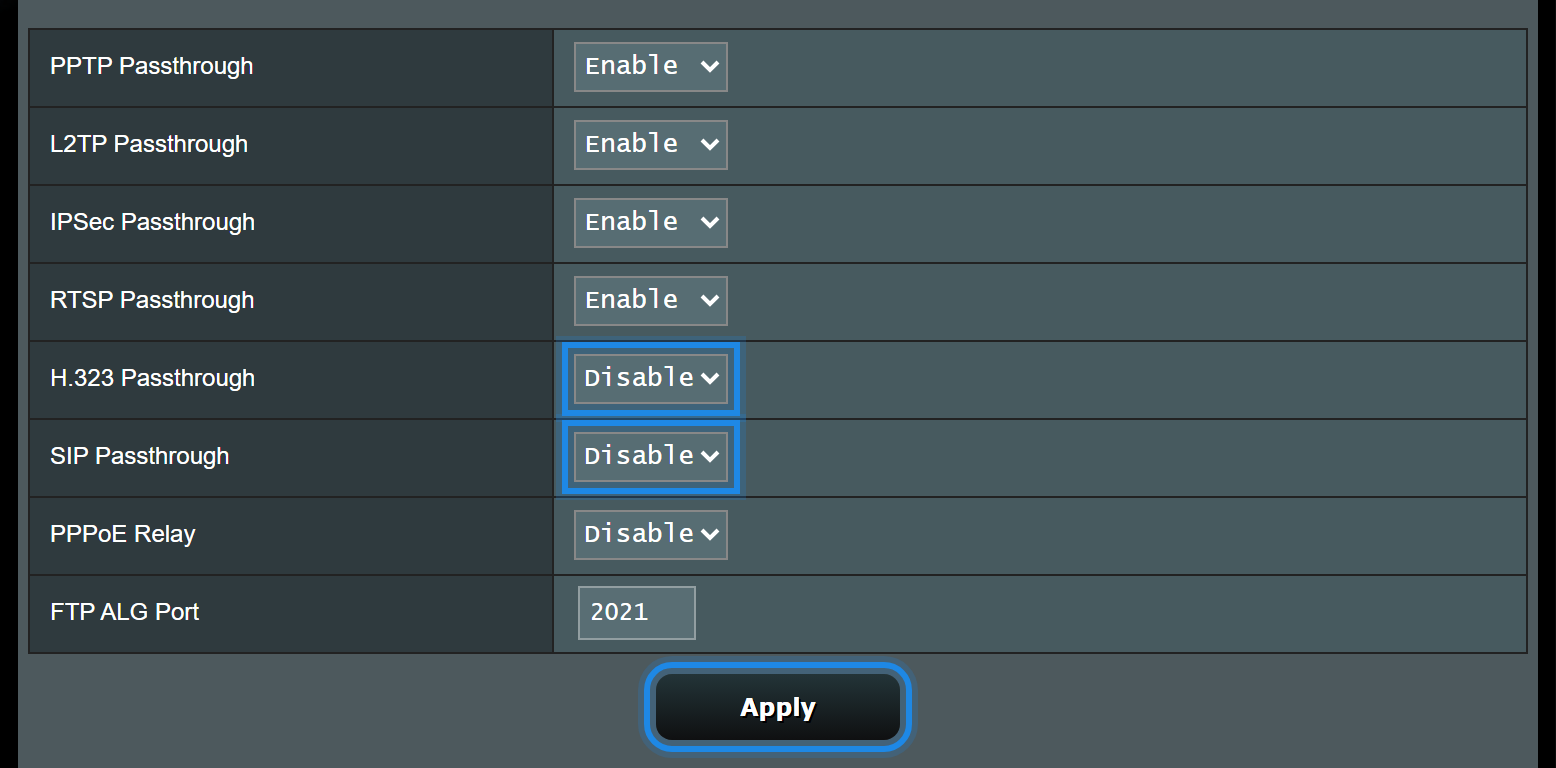
ASUS calls SIP ALG "SIP Passthrough". Turning it, and H.323 Passthrough, off stops the router rewriting voice calls.
What you'll need
- An administrator sign-in for the ASUS
- A quiet moment: changing these settings can drop calls in progress
Turn off SIP ALG
Open NAT Passthrough
Sign in to the router, then go to Advanced Settings > WAN > NAT Passthrough.
Disable SIP and H.323
Set SIP Passthrough and H.323 Passthrough to Disable, then select Apply.
Still not working?
- Restart one phone and make a test call.
- If there's another router between this one and the NBN box, it needs SIP ALG off too.
- Still stuck? Open a ticket with your ASUS model and what happens on a call (no audio, one-way audio, or calls dropping).
What's next
- Get any router or firewall ready for VoIPThe settings every router needs for voice
- Quality of Service (QoS): DSCP, TOS and precedence chartGive voice calls priority
Steps follow ASUS FAQ 1011727. Screenshot from ASUS's own web interface simulator.
